How to Blacklist Customers in WooCommerce and Stop Fraud Before Checkout: A Complete Prevention Guide
You receive an order for $2,000 worth of products. The payment processes immediately. You ship the items. A week later, the customer disputes the charge with their bank. They claim they never made the purchase. The payment reverses. You’ve lost both the merchandise and the payment. You’re out $2,000.
This scenario happens thousands of times daily across e-commerce. Fraudulent customers exploit the trust inherent in online transactions. They use stolen payment information. They create fake accounts. They place orders they never intend to pay for. They disappear.
The problem compounds when you don’t learn from experience. A customer commits fraud once. You process the refund and move on. They try again under a different email address. Then a different name. Then from a different IP address. You keep getting defrauded by the same person because you’re not connecting the dots.
This is where blacklisting becomes essential. Not as punishment, but as protection. Identifying patterns, the same IP address placing multiple fraudulent orders, the same phone number used across different fraudulent accounts, the same billing address used for different names, and blocking those patterns prevents fraud before it costs you money.
This guide explores comprehensive fraud prevention, from manual strategies to automated systems, helping you protect your WooCommerce store from fraud at every stage.
Understanding E-Commerce Fraud Before Checkout
To prevent fraud, first understand what you’re fighting against. E-commerce fraud comes in several forms, each with different signatures.
Chargeback Fraud
A customer places an order with a valid payment method. The order processes. They receive the products. Later, they contact their bank claiming the transaction was unauthorized or the products never arrived. The bank reverses the charge. You’ve already shipped the merchandise. This is the most common fraud type and the hardest to prevent.
Payment Fraud
A customer uses stolen or synthetic credit card information to place an order. The payment might process initially but eventually gets disputed as fraudulent. Your store shipped merchandise for a payment that was never legitimate.
Account Takeover
A fraudster gains access to a legitimate customer’s WooCommerce account. They use that account to place orders. The real customer discovers unauthorized charges. Your store looks complicit even though you weren’t directly defrauded.
Return Fraud
A customer places an order, receives it, then returns something entirely different (or nothing at all) claiming it’s what they received. You’re out the original merchandise plus return shipping.
Promo Code Abuse
Fraudsters exploit discount codes intended for specific customers. They use the codes across multiple accounts to purchase heavily discounted merchandise, then resell it. You take a loss on each transaction.
Refund Fraud
A customer places an order, receives the product, requests a refund, receives the refund, and keeps the product. On small-value items, this is often not worth investigating. On high-value items, it costs you significantly.
These fraud types have different prevention strategies. Some are detectable before checkout. Others only become apparent after the fact.
Why Prevention Before Checkout Matters
You might assume that fraud is a payment processor problem. They should catch it, right? In reality, fraud prevention responsibility is shared. Payment processors catch some fraud through automated systems. But they can’t catch everything.
They also have different priorities. While payment processors work to reduce fraud, merchants often require additional safeguards tailored to their specific business needs. Preventing fraud before checkout is critical because:
Financial Impact
When fraud gets through, you lose the merchandise, the payment (if charged back), shipping costs, and time investigating. A single fraudulent $5,000 order costs you far more than $5,000 once chargebacks and investigation are factored in.
Operational Burden
Handling fraudulent orders consumes support resources. Chargebacks require documentation. Investigating patterns takes time. Refunding fraudsters is administrative overhead.
Inventory Loss
Fraudsters order best-selling items and disappear. Your inventory is gone. Legitimate customers can’t purchase. Revenue opportunity is lost.
Reputation Risk
Serial fraudsters, especially account takeovers, make your store look insecure. Legitimate customers worry about account security. Your brand reputation suffers.
Chargeback Fees
Each chargeback costs money directly (typically $15-$100 per chargeback). Multiple chargebacks trigger higher processing fees from your payment processor. Eventually, your account might be closed.
Preventing fraud before checkout eliminates all these downstream costs.
Fraud Detection Methods: What to Implement
Fraud prevention requires layered defenses. No single method catches all fraud. Multiple methods working together create robust protection.
Address Verification System (AVS)
AVS compares the billing address provided during checkout against the address on file with the credit card company. A mismatch triggers a warning. This is basic but catches sloppy fraudsters using stolen cards without knowing the associated address.
Enable AVS in your payment processor settings. It’s usually on by default.
Card Verification Value (CVV) Checking
CVV is the 3-digit code on the back of credit cards. Fraudsters often don’t have this information when using stolen card numbers. Requiring CVV verification catches many fraudulent attempts.
Most payment processors check CVV automatically. Ensure your settings require it.
IP Address Analysis
A customer from New York places an order. Their IP address shows they’re connecting from Nigeria. That’s suspicious. Either they’re traveling or they’re using a VPN to hide their location. Either way, it’s a signal worth investigating.
Track the geographic location of IP addresses placing orders. When location doesn’t match the customer’s stated location or previous orders, flag it.
Velocity Checks
How many orders has this customer placed in the last hour? In the last 24 hours? If a customer suddenly places 10 orders in 2 hours, that’s abnormal. Fraudsters often rush to place multiple orders before their account is identified.
Set velocity limits in your payment processor. Flag accounts exceeding normal ordering patterns.
Email Domain Verification
Does the customer’s email domain have a history of fraud? Some email domains (temporary email services, for example) are associated with fraudulent activity. Flagging orders from suspicious email domains creates an opportunity to investigate before processing.
Billing and Shipping Address Mismatch
Legitimate customers often have billing addresses different from shipping addresses (ordering to a gift recipient, for example). But significant mismatches can indicate fraud. A billing address in California and shipping address in Nigeria warrants investigation.
Phone Number Validation
Does the phone number provided match a real customer? Can you verify they own it? Services exist that validate phone ownership. This is a friction point for fraudsters.
Manual Review Thresholds
Set rules triggering manual review:
- Orders over a certain amount (e.g., over $1,000)
- Orders with high-risk indicators (multiple flags, suspicious patterns)
- Orders from new customers using expensive shipping methods
- Orders requesting expedited shipping to high-risk countries
Manual review adds friction but catches fraud intelligent payment processors might miss.
Negative Database Checks
Services maintain databases of known fraudulent emails, phone numbers, and IP addresses. Check incoming orders against these databases. A match indicates known fraud.
Customer Behavior Analysis
Legitimate customers have patterns. They order from consistent locations. They use consistent payment methods. They order similar product types. Deviations from established patterns can indicate account takeover or fraud.
Track customer behavior. When patterns change dramatically, investigate.
Systematic Blacklisting: Taking Control of Your Fraud Prevention
Beyond reactive fraud detection, proactive blacklisting prevents known bad actors from attempting fraud again.
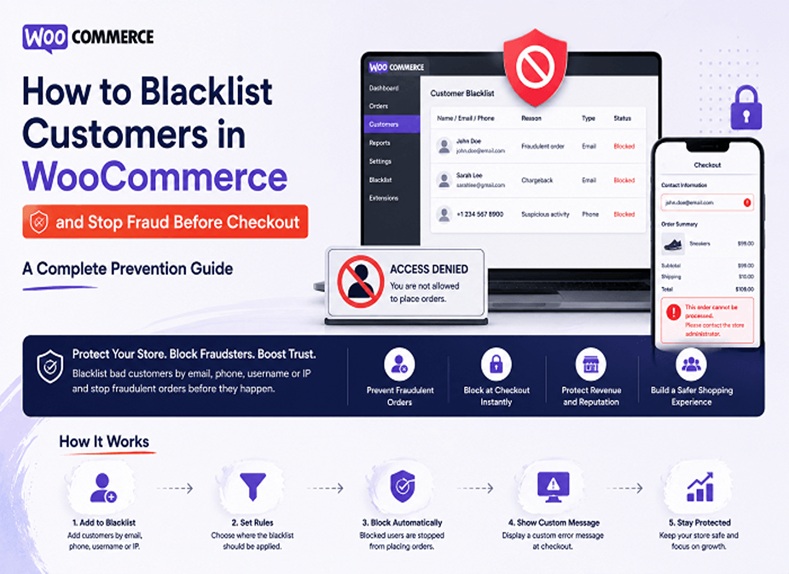
A customer commits fraud. You investigate and confirm it. Instead of just processing a refund, you add them to a blacklist. You block their email. You block their IP address. You block their phone number. The next time they try to place an order, under a different name, different account, your system recognizes them and blocks the order.
Effective blacklisting involves two key steps: identifying fraudulent activity and preventing repeat attempts.
Identifying Fraud
The first step is confirming that fraud actually occurred. Not every disputed charge is fraud. Sometimes legitimate issues create disputes. Sometimes customers are mistaken.
Review chargebacks carefully. Did the customer claim they never received the item? Check shipping records. Did they claim they never placed the order? Check account access patterns. Did they dispute the charge amount? Check the order.
Once you confirm fraud actually occurred, add the fraudster to your blacklist.
Blocking the Fraudster
With fraud confirmed, block their identifying information:
- Email address (and potentially the entire email domain)
- Phone number
- IP address
- Billing address
- Name
- Any combination of these
By blocking multiple identifiers, you catch fraudsters who try to circumvent your protection by changing one variable.
Solutions for WooCommerce Fraud Prevention and Blacklisting
Multiple approaches exist for managing fraud prevention and blacklisting in WooCommerce.
Payment Processor Native Features
Stripe, PayPal, Square, and other payment processors include fraud detection and blocking. Some offer lists you can add known fraudsters to. These work but are limited to fraud detection within the payment processor. They don’t connect with other store systems.
Manual Spreadsheet Tracking
Some store owners maintain spreadsheets of known fraudsters. They manually review incoming orders against the list. This is free but labor-intensive and error-prone. As your store grows, manual tracking becomes impractical.
Dedicated Security Plugins
WooCommerce plugins specifically designed for fraud prevention and blacklisting exist. These integrate directly with WooCommerce, creating seamless blocking. Some allow rule-based blocking by email, IP, phone number, geographic location, and order value. They maintain activity logs showing what was blocked and why.
For example, store owners can use a WooCommerce blacklist plugin to create rules based on customer details such as email addresses, IP addresses, phone numbers, and billing information. Depending on the configuration, suspicious orders can be blocked, flagged for review, or automatically cancelled before they are processed.
These plugins typically offer better integration than payment processor tools and more automation than manual tracking.
Custom Development
Large enterprises sometimes build custom fraud prevention systems. This is expensive but offers complete control. For most WooCommerce stores, however, custom development is often unnecessary due to the availability of specialized fraud prevention solutions.
Setting Up Manual Fraud Prevention Processes
Before implementing automated solutions, establish manual processes catching obvious fraud.
Review High-Risk Orders
Set rules requiring human review of certain orders:
- Any order over a threshold value (e.g., $2,000+)
- Orders with multiple fraud indicators
- Orders from new customers in high-risk countries
- Orders using payment methods different from the customer’s history
Review these orders before processing. Ask yourself: Does this look legitimate? Is the customer verified? Do the shipping and billing addresses make sense?
A quick manual review catches obvious fraud that automated systems might miss.
Verify High-Risk Transactions
For orders that seem suspicious but not obviously fraudulent, contact the customer. A simple email, “We received your order. Can you confirm you placed it?”, weeds out fraudsters. Legitimate customers confirm immediately. Fraudsters disappear.
Maintain Fraud Records
When you confirm fraud, document it. Record the email, IP address, phone number, billing address, and payment method. Maintain a simple spreadsheet or document. Reference it when reviewing future orders.
This becomes your internal blacklist database.
Establish Clear Refund Policies
Ambiguous refund policies invite fraud. Make yours crystal clear:
- What’s refundable and what isn’t
- Time windows for refunds
- Condition requirements (unopened, unused, etc.)
- Inspection processes before refunding
Clear policies reduce fraudsters exploiting gray areas.
Communicate Policies Clearly
Post your fraud, refund, and security policies prominently. Legitimate customers appreciate clarity. Fraudsters are deterred by detailed policies suggesting you actually investigate.
Automated Blocking: When Manual Processes Aren’t Enough
As your store grows, manual fraud prevention becomes inadequate. You need automated rules blocking known bad actors.
At minimum, automated blocking should catch:
Repeat Offenders
A customer commits fraud. You identify them. You block their email. They try again with a different email but the same phone number. Your system recognizes the phone number and blocks them.
Pattern Recognition
Multiple orders from the same IP address in rapid succession. Multiple orders using different emails but the same phone number. These patterns indicate organized fraud. Automated systems recognize and block them.
Geographic Red Flags
Orders shipping to high-risk countries. Orders with billing addresses mismatched from shipping addresses in suspicious ways. Orders using payment methods from countries different from stated location.
Order Value Anomalies
A customer’s typical orders are $50-100. Suddenly they place a $5,000 order. This deviation warrants investigation before processing.
Velocity Violations
More than X orders in Y timeframe from a single source. More than X failed payment attempts in Y timeframe. These indicate either account takeover or organized fraud.
Automated systems catch these patterns consistently without requiring manual review of every transaction.
Payment Verification and Security Measures
Beyond blocking, strengthen payment security:
Require Customer Accounts
Require customers to create accounts before purchase. This creates accountability. Fraudsters prefer guest checkout where they’re anonymous.
Implement 3D Secure
3D Secure (also called 3DS) adds a verification step during credit card checkout. The cardholder is prompted to verify themselves with their bank. This reduces unauthorized transactions significantly.
Enable 3D Secure in your payment processor settings.
Use Fraud Scoring
Payment processors assign risk scores to transactions. Higher scores indicate higher fraud probability. Set thresholds requiring manual review for high-score transactions.
Monitor Chargeback Ratios
Track your chargeback rate. Payment processors monitor this. High chargeback rates trigger fees and eventually account closure. If your rate is climbing, fraud prevention isn’t working adequately.
Maintain Documentation
Keep detailed records of every order, communication, shipping confirmation, and delivery proof. In chargeback disputes, documentation is your defense. Detailed records often win chargebacks that would otherwise be reversed against you.
Best Practices for Ongoing Fraud Prevention
Fraud prevention isn’t one-time setup. It requires ongoing attention.
Review Fraud Regularly
Monthly, analyze fraud patterns. Which types are most common? Which prevention methods are most effective? What’s slipping through? Use this analysis to adjust your defenses.
Update Your Blacklist
As you confirm fraud, add offenders to your blacklist. Review old entries. Have fraudsters tried again? Are they still active? Update your list based on current data.
Test Your Defenses
Periodically test your fraud prevention. Can someone with blocked email create account with different email? Can someone with blocked IP order using VPN? Identify gaps.
Stay Updated on Fraud Trends
Fraud evolves. New techniques emerge. Stay informed through payment processor alerts, security blogs, and WooCommerce forums. Adjust defenses as threats evolve.
Train Your Team
If you have staff handling orders, train them on fraud indicators. What should they watch for? When should they escalate? Team awareness catches fraud that systems miss.
Monitor Competitor Activity
Are competitors in your space experiencing fraud waves? Industry-specific fraud patterns emerge. When you hear about fraud affecting similar businesses, strengthen your defenses proactively.
Balancing Security With Legitimate Customer Experience
Fraud prevention shouldn’t make legitimate checkout impossible. If verification becomes too burdensome, customers abandon carts.
Balance security with usability:
For New Customers
New customers from untrusted sources warrant more scrutiny. This is appropriate, you don’t have history with them.
For Returning Customers
Established customers with positive order history need less verification. They’ve already proven legitimacy.
For Borderline Cases
When flagged but uncertain, contact the customer. A simple confirmation email is less friction than automatic blocking.
For Obvious Cases
When everything screams fraud, block immediately. Don’t prioritize user experience over store security.
Be Transparent
When you block an order, explain why clearly. Even if the customer is a fraudster, legitimate customers might trigger false positives. A clear explanation (insufficient address verification, for example) helps legitimate customers understand and take corrective action.
Measuring Fraud Prevention Effectiveness
Track metrics showing whether your defenses work:
Chargeback Rate
Measure chargebacks as a percentage of total transactions. Industry average is around 0.1%. If yours is higher, fraud prevention isn’t working adequately.
Fraud Detection Rate
Of orders flagged as risky, what percentage prove to be fraudulent? If you’re flagging lots of legitimate orders, your detection is too aggressive. If you’re missing fraud, it’s too lenient.
False Positive Rate
Of orders blocked or flagged, how many were legitimate customers? High false positive rates indicate your rules are too strict. Adjust thresholds.
Repeat Fraud Rate
Of confirmed fraudsters, what percentage try again? If high, your blacklisting isn’t working. If low, it’s effective.
Manual Review Load
How many orders require manual review? If the number is overwhelming, automate more. If it’s minimal, you might be missing fraud.
Track these metrics monthly. Trends show whether your fraud prevention is improving or degrading.
Conclusion: Multi-Layered Protection Against E-Commerce Fraud
E-commerce fraud is sophisticated, evolving, and costly. No single defense eliminates it entirely. Effective fraud prevention layers multiple strategies:
- Verify customer identity and payment information
- Analyze transaction patterns for anomalies
- Maintain detailed records supporting chargeback disputes
- Blacklist known fraudsters to prevent repeat attempts
- Review high-risk orders manually before processing
- Train your team to recognize fraud indicators
Some stores implement these strategies manually. Others use payment processor tools. Others use dedicated WooCommerce plugins creating rule-based blacklisting and blocking based on email, IP address, phone number, and geographic criteria.
Whatever approach you choose, the key is starting. Fraud prevention that begins today prevents tomorrow’s fraud. A WooCommerce blacklist system that blocks known fraudsters prevents them from costing you money repeatedly. Manual review processes catch intelligent fraud that automated systems miss.
Your store’s profitability depends partly on fraud prevention. Invest in it appropriately. The cost of prevention is always lower than the cost of fraud.
Start implementing these strategies now. Your bottom line will thank you.